LESCO BILL Calculator
How Do You Calculate The LESCO Bill Estimator?
Here are some steps to follow when using the Lesco bill estimator.
1. Electricity Connection Type
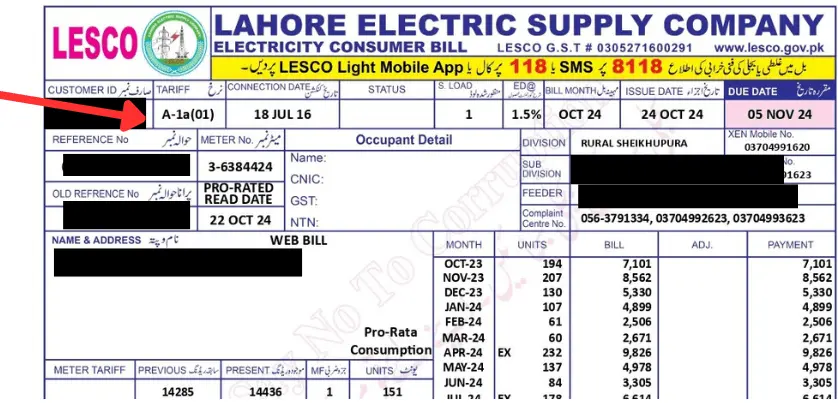
Do you know about your connection type? Please enter. However, if you don’t know, please find your bill and see the connection type. Please see the image below to find your connection type, such as A-Ia(01).
Here, you will find a drop-down menu to select the required one for Lesco bill calculator.
2. Phase Type
Select one from:
3. Meter Load
Enter the load of your meter.
4. Units Consumed
Please enter the number of units used from the types of units. Like
KWH (Kilowatt Hour)
KVARH (Kilovolt Amperes Reactive Hours)
MDI (Maximum Demand Indicator)
5. More Required Information
Here is some more information that you need to provide such as:
6. Final Step
Hit the “Submit button” to get the results. However, you can press the reset button to edit values.
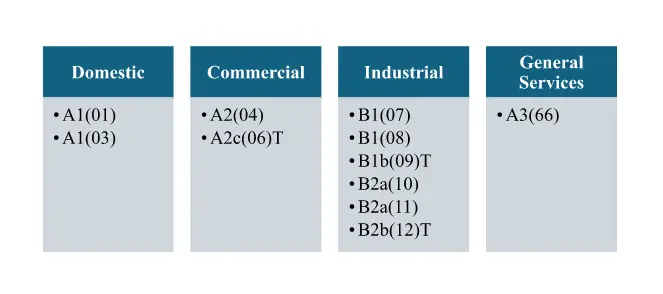
Types of LESCO Tariff
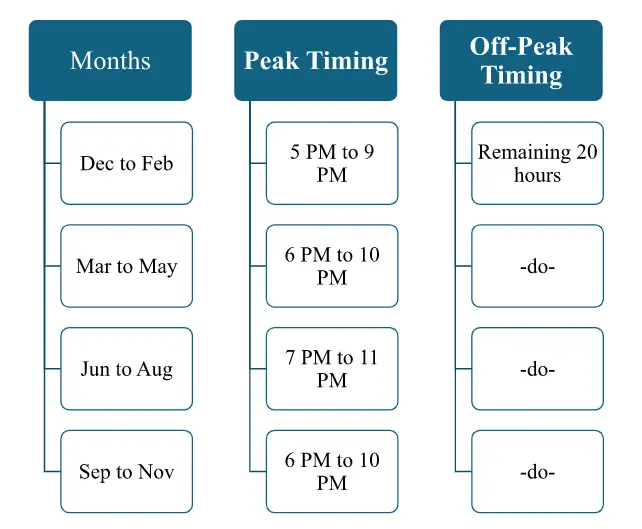
Lesco Bill Online Check for Peak / Off Peak Timings